



- 분류 [학사]
- 작성자 교무처 학사지원팀
- 조회수 752
- 작성일 2026.02.02
- 담당부서 교무처 학사지원팀
|
학생증 신규 발급 안내 |
1. 발급 대상: 2026학년도 1학기 등록을 마친 신입생 및 편입생
2. 학생증(ID 카드) 종류
|
구분 |
금융 결제 |
도서관 서비스 (출입, 도서 대출, 좌석 예약 등) |
교내시설 출입* |
전자 출결 |
|
금융 학생증 |
o 우리은행 체크카드 후불/비후불 교통카드 |
o |
o |
o |
|
비금융 학생증 |
x |
o |
o |
o |
* 교내시설 출입 권한 신규 등록 : 먼저 학과 사무실에서 출입권한 신청서를 작성하여 KT텔레캅 종합상황실에 제출하여야 하며,
이후 실물 학생증 카드 지참 후 KT텔레캅 종합상황실로 방문하면 등록이 가능합니다.
- KT텔레캅 종합상황실: 학술정보원 옆 측면(체육관 방향) 외부 엘리베이터 통해 지하 1층 이동 (☎ 02-2123-3700)
3. 학생증 발급 신청
1) 학생증 신청을 위한 학번 조회
※ 학생증 신청 시, 학번으로 생성된 계정(ID: 학번, PW: 생년월일 6자리)으로 새로 로그인이 필요합니다. 기존 수험번호 계정으로는 학생증 신청 페이지 접속이 불가합니다.
|
구분 |
기간 |
방법 |
|
학부생 |
2026. 2. 19.(목) 오전 10시 ~ 2. 27.(금) 오후 6시 |
연세포탈서비스 → 학사정보시스템 → 로그인(아이디: 수험번호, 비밀번호: 생년월일(YYMMDD) 입력) → 학사행정 - 입학 – 학생 - (합격자) 학번조회 |
|
대학원생 |
대학원별로 학번 부여 일정이 상이하므로, 소속 대학원 행정팀을 통해 학번 조회 기간 및 방법을 확인한 후 진행하여 주시기 바랍니다. |
|
2) 학생증 신청 기간
|
신청 기간 |
카드 종류 |
유의 사항 |
|
2026. 2. 19.(목) 10:00부터 |
금융 / 비금융
※ 택1 |
▶ 신(편)입생은 최대한 2. 27.(금) 23:59 이전까지 신청 권고 (2월 27일까지의 신청 건에 한하여 3월 첫째주에 수령이 가능하며, 이후 신청 건의 경우 재학생 및 교직원 신청 건도 함께 처리되어 접수 순서대로 발급이 진행되므로 수령까지 2주 정도 소요됩니다.) ▶ 외국 국적 신입생은 비금융카드만 신규 발급 가능함. 2026학년도 2학기부터는 금융카드로 재발급 신청 가능 |
3) 신청 방법
|
[공통 절차] 금융 / 비금융 학생증 |
|
연세포탈(portal.yonsei.ac.kr) 로그인 (학번 계정 로그인 필수!) |
|
↓ |
||
|
학사LINK 메뉴 – 학생증 발급 |
||
|
↓ |
||
|
학생증/신분증 신청 메뉴에서 개인정보동의 및 신청 진행 |
||
|
|
|
↓ |
|
[추가 절차] 금융 학생증 |
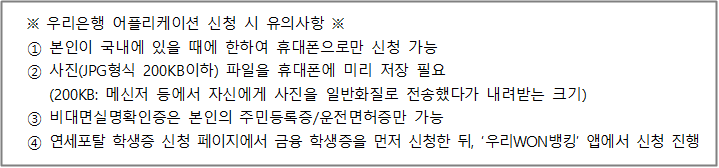
휴대폰에 우리WON뱅킹 어플리케이션 설치 |
|
|
↓ |
||
|
대학교ID카드 메뉴에서 신청 진행 (자세한 신청 방법은 연세대학교 홈페이지의 학생증 발급 공지 하단에 첨부된 ‘우리WON뱅킹 대학 학생증 카드 신청 매뉴얼’ 참조) |
4. 학생증 발급 신청 유의사항
1) 중복으로 신청하지 않도록 반드시 유의하여 주십시오. 금융/비금융 카드를 모두 신청할 경우 사용에 문제가 되며, 재신청을 해야 할 수 있습니다.
2) 금융기능이 있는 학생증을 신청할 경우 우리은행 전용 앱에서 학생증 수령 장소를 정확하게 지정하여야 합니다.
신청 후 수령지 변경 절대 불가하며, 은행 영업시간(평일 09:00~16:00) 중 지점 방문이 불가할 경우 수령지를 ‘자택’으로 설정할 것을 권장합니다.
3) 입학 후 국제캠퍼스에서 1학년 생활을 하게 될 학부 신입생이 금융 학생증을 신청하는 경우, 수령 편의를 위해서 우리은행 국제캠퍼스출장소(1학사 B동 1층)를 수령지로 지정할 것을 권장합니다.
4) 발급 완료 안내 문자 수신을 위해 연세 포탈 연락처에는 반드시 한국 내에서 연락 가능한 번호를 기재 바랍니다.
5) 외국 국적 신입생은 2026학년도 1학기에는 비금융 학생증 신청만 가능합니다.
금융 기능이 있는 학생증 으로 변경(재발급)을 희망하는 학생은 2026학년도 2학기부터 신청하실 수 있음을 알려드립니다.
5. 학생증 배부
※ 학생증 수령 시에는 본인 확인을 위해 주민등록증 또는 운전면허증, 여권 등 공식 신분증을 소지하여야 합니다.
|
구분 |
배부 시점 |
배부처 |
||||||||||||||||
|
금융 학생증 |
발급 신청 후 최대 2주일 이내 (문자로 안내 예정) |
발급 신청 시 지정한 수령지 (자택, 신촌캠퍼스 우리은행 연세금융센터, 국제캠퍼스 우리은행 출장소 중 한 곳 선택 / 신청 후 수령지 변경 불가) |
||||||||||||||||
|
비금융 학생증 |
▶ 신촌캠퍼스
▶ 국제캠퍼스: 소속 대학(원) 행정팀
|
6. 문의처
가. 학생증 발급 일반 문의 : 교무처 학사지원팀 종합서비스센터(02-2123-3200)
나. 우리은행 전용 앱 : 02-1588-5000-0-2-2 또는 02-1599-5000-0-2-2
다. 오류발생 시: 우리카드 02-1588-9955
라. 신촌캠퍼스 금융카드 발급(우리은행 연세금융센터) : 02-313-3198 -> 내선 313
마. 국제캠퍼스 금융카드 발급(우리은행 국제캠퍼스 출장소) : 032-822-6321
[학생증 신청 FAQ]
1. 연세 포탈 로그인 이후 ‘학생증 신청’ 페이지 접속 시 대상자가 아니라고 뜹니다.
➔ 수험번호 계정이 아닌 학번 계정으로 로그인하여 ‘학생증 신청’ 페이지에 접속하시면 됩니다.
2. 모바일 학생증 발급이 안 됩니다.
➔ 모바일 학생증은 실물 플라스틱 학생증 카드 수령이 완료된 이후부터 발급이 가능합니다. 플라스틱 학생증과 모바일 학생증은 동시에 사용하실 수 없으며, 활성화된 한 가지 유형의 학생증만 이용할 수 있음을 안내해 드립니다.
3. 금융 학생증 신청했는데, 은행으로 언제 받으러 가면 되나요?
➔ 금융 학생증 발급은 신청 접수일로부터 1주일 이상 소요됩니다. 학생증이 발급되면 은행으로부터 카카오톡 안내 문자가 발송될 예정입니다. 문자 수신 후 은행 방문하여 수령하시면 됩니다.
4. 금융 학생증 신청 시 선택한 수령지는 신청 이후에 변경할 수 있나요?
➔ 금융 학생증 수령지는 자택 또는 우리은행 연세금융센터(신촌), 우리은행 국제캠퍼스출장소(송도) 중 한 곳으로 선택이 가능합니다. 신청 완료 후 수령지 변경은 불가하므로 신청 시 수령지 선택을 신중히 해주시기를 바랍니다.
자택 배송의 경우, 신청일로부터 5영업일 내외 발송되므로 이사/기숙사 입사 일정 등을 충분히 고려한 후 신청하시기를 바랍니다. 또한, 은행 영업점으로 수령지 선택 시 자택/회사로의 재배송이 불가하며 인근 우리은행 영업점으로의 수령지 변경만 가능합니다.
5. 우리WON뱅킹 앱 신청 중, ‘후불교통카드’ 기능 선택 시 발급 불가 에러 메시지가 뜹니다.
➔ 만 18세 미만의 미성년자는 ‘비후불카드’로 신청하시면 정상적으로 신청 가능합니다.
6. 우리WON뱅킹 앱 신청 중, 개인정보(회사명/부서명) 기재 후 에러 메시지가 뜹니다.
➔ 회사명/부서명에 특수문자가 포함되거나 길이가 긴 경우(10글자 이상) 에러 메시지가 표출됩니다. 특수문자 제외한 10글자 이내의 회사명/부서명을 입력하여 신청을 진행해 주시기를 바랍니다.
7. 비금융 학생증 신청했는데, 언제 받을 수 있나요?
➔ 2월 19일부터 2월 27일까지 신청된 학생증은 3월 4일 이후 소속 대학(원) 행정팀 사무실에서 배부할 예정입니다.
2월 28일부터 신청된 학생증은 발급까지 최대 2주일 소요되며, 발급 완료 문자 수신 후 아래 장소 방문하여 수령하시기를 바랍니다.
* 신촌캠퍼스: 교무처 학사지원팀 종합서비스센터 (언더우드관 B101호)
* 국제캠퍼스: 소속 단과대학 행정팀
교무처 학사지원팀
|
New Student ID Card Issuance Guide |
1. Eligibility: Newly enrolled International students for 2026 Spring Semester
2. Types of Student ID Cards
|
Type |
Check card function |
Library access |
Campus facility access* |
Attendance |
|
Financial Card |
o |
o |
o |
o |
|
Non-financial Card |
x |
o |
o |
o |
* New Registration for Campus Facility Access Permissions: Please complete the access permission application form at your department office and submit it to the KT Telecop Control Room.
Then, bring your physical student ID card to the KT Telecop Control Room in person to complete the registration.
- Location: Basement Level 1, via the external elevator next to the Library (toward the gym)
- Tel: +82-2-2123-3700
3. Student ID Application
1) Student ID number inquiry
※ When applying for a student ID card, students must log in again using the student ID account. Access using the examinee’s number account is not permitted.
|
Category |
Period |
Method |
|
Undergraduate |
Feb. 19 (Thu) 9:00 AM ~ Feb. 27 (Fri) 6:00 PM |
Yonsei Portal Service (https://portal.yonsei.ac.kr) ⇒ Login with your examinee’s number and password(D.O.B. in YYMMDD form) ⇒ Academic Information System ⇒ Academic Affairs ⇒ Finding the student ID number |
|
Graduate |
The schedule for assigning student ID numbers varies by graduate school. Please check with your graduate school's administrative office to confirm the period and method for checking your student ID number before proceeding. |
|
2) Application Period
|
Period |
Types |
Notice |
|
From February 19th (Thu) 10:00 AM |
Non-Financial |
▶ New students are strongly advised to apply by Feb 27th (Fri) 11:59 PM.*
▶ New international students can only apply for non-financial cards. Starting from the second semester of 2026, they can apply for (re)issuance of financial cards. |
* Applications submitted by February 27th will be available for pickup during the firstweek of March.
Applications submitted after this date will be processed along with those from current students and faculty members.
As they will be issued in the order they are received, it will take approximately two weeks for pickup.
3) Application Method
|
Non-Financial |
|
Yonsei Portal login (student ID account required) |
|
↓ |
||
|
Academic LINK Menu – Issue Student ID |
||
|
↓ |
||
|
Consent to personal information and submit application |
4. Important Notes for Student ID Application
1) Please ensure that you do not submit multiple applications. Submitting duplicate applications may cause issues with usage and could require you to reapply.
2) International freshmen may only apply for non-financial student ID cards for the first semester of the 2026 academic year.
Students wishing to change (reissue) to a student ID card with financial functions may apply starting from the second semester of 2026.
3) Please ensure that you provide a valid Korean mobile phone number in the portal in order to receive the notification message once your card has been issued.
5. Card Distribution
※ When picking up your student ID card, you must bring an official form of identification, such as a passport, for verification purposes.
|
Types |
Timing |
Pickup location |
|
Non-Financial ID card |
Issued within approximately two weeks after application.
(Notice of receipt will be sent via text) |
▶Sinchon - Applications submitted from Feb. 19 to 27: Affiliated college administrative office - Applications submitted from Feb. 28: Academic Support Team (Underwood Hall B101)
▶International: College Administrative Office - University College: Libertas Hall A, #604 - Underwood International College: Veritas Hall B, #420 - Global Leaders College: Libertas Hall A, #501 - College of Computing · School of Integrated Technology: Veritas Hall C, #218 · School of Computing: Libertas Hall A, #604 |
5. Inquiries
1) University Service Center on Student ID Card : +82-2-2123-3200
2) Banking Service for international students at Woori Bank : +82-2-1599-2288
3) Woori Bank Yonsei Financial Center Sinchon Campus : +82-2-313-3198 Ext. 313 or 321
4) Woori Bank Songdo International Campus Center: +82-32-822-6321
[Student ID Application FAQ]
1. After logging into the Yonsei Portal, it says I am not eligible when accessing the 'Issue Student ID' page.
➔ You can log in with your student number account instead of your examination number account to access the page.
2. The mobile student ID cannot be issued.
➔ The mobile student ID is available after you have received your physical student ID card.
Please note that the plastic student ID card and the mobile student ID cannot be used simultaneously. Only one activated type of student ID may be used at a time.
3. I have applied for a non-financial student ID card. When can I expect to receive it?
➔ Student ID cards applied for between February 19 and February 27 will be distributed starting March 4 at the administrative office of your affiliated college(or graduate school).
Student ID cards applied for starting February 28 will take up to two week to process. Please visit the location below to pick up your card after receiving the issuance completion text message.
▶ Sinchon Campus: Academic Affairs Support Team (Underwood Hall, B101)
▶ International Campus: College Administrative Office
Office of Academic Affairs